
The Common SEO Mistakes I See In DIY Showit Websites As a Designer
When it comes to your site SEO it sometimes feels like that diamond on top of a mountain that you can’t seem to reach, but you’re always trying to figure out the best path to get there. You keep climbing and trying and hoping you “figure it out”? As a Showit website design partner, I’ve been in sooo many accounts, and these are the things that I see happening that you can easily fix today in your Showit account.
1. Incorrect Heading Tags (especially H1 tags)
Wondering why this is so important? Search engines use headings to best understand your website pages and their contents of it. Think of it like this: H1 would be the main topic of the page, H2 would be the main sections of the page, and H3 would be the subtopics of the page. The clearer you can be with your hierarchy, the better it is for users and crawlers. It is VITAL that you only use one H1 tag per page!
The goal isn’t to keyword-stuff every heading but to give guidance and direction. This is extremely important to accessibility too, for screen readers who will navigate pages by jumping between headings. When you’re using the headings make sure that you’re not jumping from a H1 to H3 it needs to be in order and have it so that users don’t lose context.
This can feel like a tedious task to check, but thankfully you can check your heading structure using different websites, and VertaaUX is a personal favorite. I like this one because it shows you the heading tree so you can make sure it all flows chronologically!
What are the options for heading tags and how to use them:
H1- Primary topic, only one per page!
H2- The main sections throughout the apge that help break it up!
H3- The subsections that break up the details under the H2.
H4 through H6- Sections taht break it down even more detailed, rarely do you make it past H4
Div- Used for things on the pages that have no structural meaning. This could be little stickers, extra decorative text, things that really don’t tell people anything. I tag things that feel decorative with this.
Nav- This is for text that would be considered a button, linking to another page or a url.
How to change Heading tags within Showit:
In showit this is how to check your heading tags: First, click on a text body and then head to the side bar clicking on the text properties button and making sure the drop down in the text tag options is correct for the order of text on the website.

2. Incorrect linking
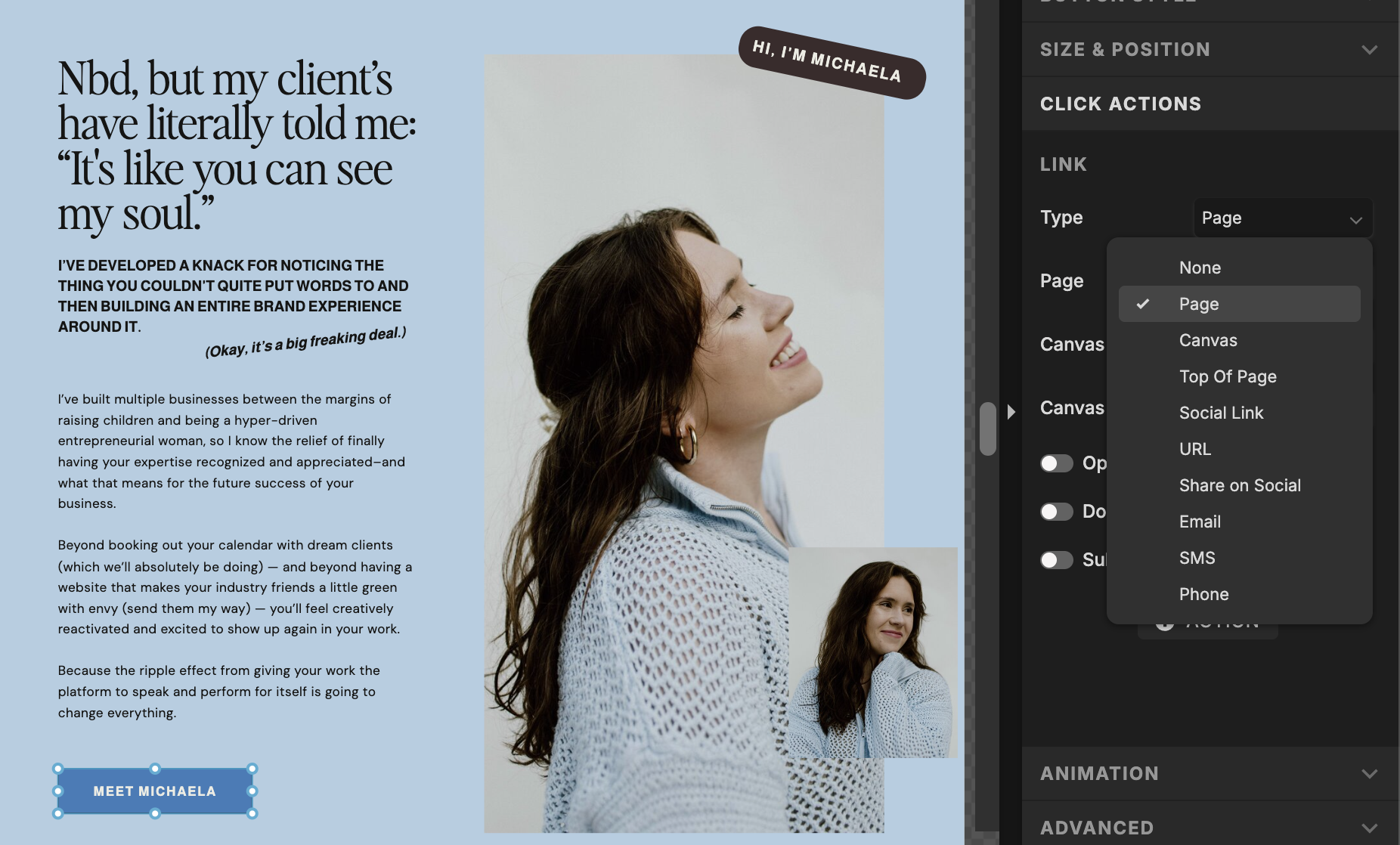
Building a webiste is tedious, there’s no doubt about that. A lot of things are little and can get lost BUT thankfully I am here to tell you about the most common ones, and to add to the list is linking. When you’re building your site make sure all the things that are set with a click action in Showit acutally carry out the click action! I have seen the most mistakes in this area with templates because sometimes images have a click action and it get’s missed and it leaves you with a broken link.
Here’s the place you go to fix that in showit:
What it should look like

What it looks like when it will lead to a broken link, It’s when you leave it open eneded and the site is getting ready to lead you somewhere andcant fufill it:


The Importance of fixing broken links
The number one reason is user experience, you want people to get to where they need to go when they’re clicking links. If you’re on a site and click a button that leads to nowhere, you’re also loosing trust in that site… we don’t want that for you. On another note it hurts your SEO which we don’t want. Aka getting us closer to the top of the SEO mountain.
I use Siteliner to check my broken links because it goes into my blog posts checking those too.
3. Site loading speed
We want your potenital clients to find their information and find it fast so a fast loading time is essential especially for industries like photographers who have a lot of images on their website! I downloaded an app called jpeg mini which you can download for a one time fee of $60 and it reduces your file size without messing with quality. Allowing you to be able to keep the quick loading time! There are also free sites like free convert that get the job done!
Not sure if your site is loading as fast as it should be check out google’s site speed insights. You’ll want to make sure you have your site loading as fst as you can because google will priortize sites that do rank the fastest.
4. Page Titles and Meta Descriptions
On some platfroms they have AI or a way for this to be taken care of for you, but with showit you have more control which is awesome, but we want to make sure you don’t forget the important steps! One thing I have seen is empty boxes for the Page titles and meta descriptions… and if you’re not a designer I don’t blame you on missing this because it’s a little hidden. BUT no need to fear I got you covered!
Here’s where you will find your Page title and meta description boxes to fill in:
You’ll want to make sure the left tab is set to page so that on the right you find the tab labeld “SEO SETTINGS” then you will see the pop out with the two boxes to fill in AND the option to upload an image.

If you upload an image (which you absolutely should) it’s now your option of image that shows up when you share your website link:

5. Keyword Stuffing
As much as I like to reserve the word stuffing for Thanksgiving, it also applies to keyword usage. It’s easy to think, “Oh, I want to better my chances to rank for certain things, so I’ll place it anywhere I can”. Not bad logic, but Google doesn’t like it.
Why is it a no-go? Well, Google likes websites that cater well to the people that are viewing them. If you’re stuffing all these keywords without providing any actual value, then that’s an issue. It will increase your bounce rate, which is how fast people leave your website. It also comes off as spammy, and “Google explicitly bans keyword stuffing in its Search Spam Policies as a manipulative black-hat tactic”
Talk naturally to the users; add in keywords where they provide value, not just stuffing to hope to rank. If writing your website feels hard and confusing, you can also resort to a copywriter to help you talk in a way that converts, or hire an SEO strategist to help you improve what you’re working with!
Some of my favorite industry peeps are:
SEO
Website Copy
Hilary Rota (she also has a DIY copy guide)
Is this to scare you from investing in the website template and DIYing when you only have the budget to do so? No. I want to share this with you so that you’re fully aware of the things I see go wrong that you can avoid! I want you to be successful and not be stuck with a webstie you poured so many hours into that you’re like ummmm… is it going to work?
If you get far but wish you could have someone do the tedious steps like the ones in this post… I have VIP day option where I cover things just like this!
OR If you’re like screw this, I dont want to DIY this, you’re in luck you can explore my website design packages!